AI Agents vs Automations: What an Agent Can Actually Do (and When You Need One)
"Agent" is the word of the year, and it is used for everything from a chatbot to a system that runs a department. Here is a definition you can use in a meeting.
An automation follows rules. An agent follows goals. An automation does exactly what you wired: if the email contains "refund", send reply A. An agent reads the email, works out what the person needs, decides what to do, and can use tools to find out more or take action.
The same job, two ways
In the Automation Lab you do both. In Level 2 you build a rule: filter emails that mention refund, send a fixed reply. It works, until Nina asks about a delivery and gets "thanks, we are on it." In Level 3 you replace the rule with an agent, and each customer gets a reply written for them.
| Automation | AI agent | |
|---|---|---|
| Decides by | Rules you write | Reading the input against a goal |
| Handles surprises | Badly: unmatched items fall through | Well: it interprets new cases |
| Predictability | Identical every time | Varies; needs guardrails |
| Cost per run | Near zero | Costs a model call |
| Best for | Moving and copying data, alerts, logging | Reading, classifying, writing, choosing tools |
What an agent can really do
Forget the science fiction. In real business workflows today, agents are good at five jobs:
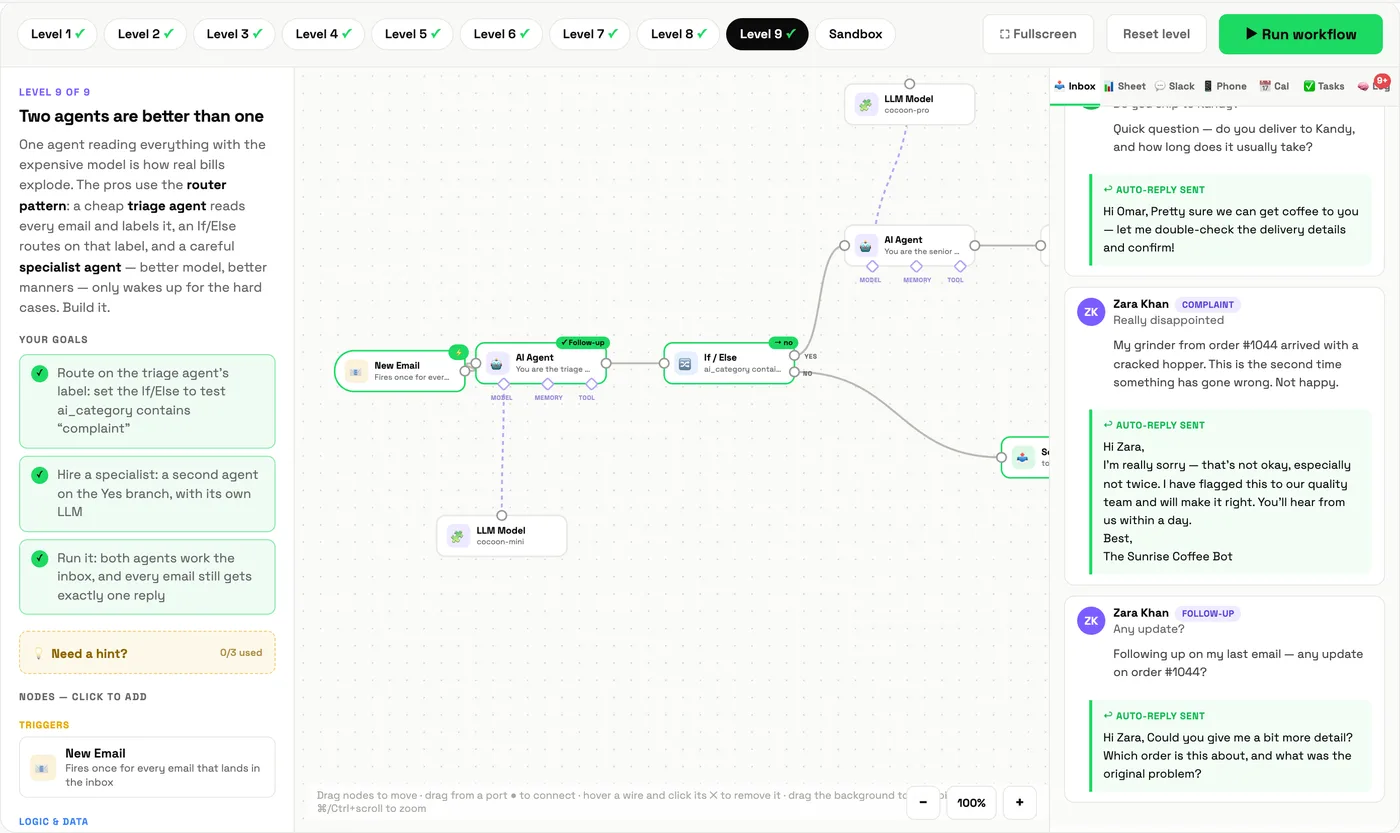
- Classify and route. Read a message and label it: refund, question, complaint. Then the workflow branches on that label.
- Write for the individual. A reply, a summary, a proposal draft that fits this specific case.
- Look things up. With tools connected, check an order status or a policy and answer with facts. Without tools, agents guess, confidently.
- Remember. With memory, recognise a follow-up and continue the conversation.
- Act. Trigger the next step: book a calendar slot, create a task, message the customer.
Put together, it looks like this. A triage agent labels each email, a branch sends complaints to a more capable specialist agent, and everyone gets one reply:
Where agents fail
- They guess when they lack data. Give them tools.
- They drift when the prompt is vague. Write the prompt as a job description with rules and "never" lines.
- They forget. Add memory when conversations span messages.
- They cost more than rules. Do not use an agent to copy a field from A to B.
How to decide: the three-question test
- Can I write the rule in one sentence? Use an automation.
- Does the step need reading, judgement or writing? Use an agent step, inside an automation.
- Would a mistake here hurt a customer or cost real money? Keep a human check, whatever you choose.
Notice the answer is rarely "agent instead of automation." The best systems are automations with an agent in the one or two places that need a brain. The Workflow Mapper helps you find those places: steps tagged "could run itself" are rules; steps tagged "AI assists you" are where an agent belongs.
Learn it with Cocoon
Knowing when not to use an agent is as valuable as knowing how to build one. Cocoon's trainers teach both, with hands-on builds and the judgement that comes from deploying agents in real businesses. It is why teams across the region choose Cocoon as their AI training and upskilling company. See our programmes or book a call.
Frequently asked questions
What is the difference between an AI agent and an automation?
An automation follows fixed rules you define: if this, then that. An AI agent reads each item, interprets it, decides what to do, and can call tools to get information or take actions. Automations are predictable; agents are flexible.
What can AI agents actually do today?
Classify and route messages, draft personalised replies, look up information through connected tools, summarise documents, fill in structured data from messy text, and take actions such as booking a calendar event, all inside guardrails you set.
When should I use an automation instead of an agent?
When the rule is clear and the inputs are predictable. Rules are cheaper, faster and easier to audit. Use an agent only for the steps that need reading, judgement or language.
Are AI agents safe for customer-facing work?
They can be, with guardrails: a structured prompt with clear rules, tools for facts instead of guessing, memory where needed, human review for high-stakes cases, and monitoring for errors.
Build a rule-based automation, then swap in an agent, and feel the difference in ten minutes.
Try it in the Automation Lab →