How to Map a Department's Workflows: Roles, Handoffs and the Gaps Between
Map one person's job and you will find a few hours a week. Map a department and you find something bigger: the spaces between people. The report that marketing sends to sales, which sales re-types into the CRM, which finance then exports again. Nobody owns those gaps, which is exactly why they are full of waste.
Here is the method we use when a whole team comes to a Cocoon workshop.
Rule 1: Map roles, not org charts
An org chart tells you who reports to whom. It tells you nothing about how work moves. Start by listing the roles that touch the work, including the ones outside the department: the director who approves, the agency that designs, the client who replies late.
Then have each person map their own role. Not their manager, them. Managers describe the process as designed; the people doing it describe the process as lived. You need the second one. In a workshop, everyone does this at once in the Workflow Mapper: fifteen minutes, one map each, with the role's steps tagged by who or what does them.
Rule 2: Name the actor on every step
A step without an owner is a step that will be dropped. On a good department map every box says who does it: a named role, a system, or an AI assistant. The mapper groups steps into lanes by actor for exactly this reason:
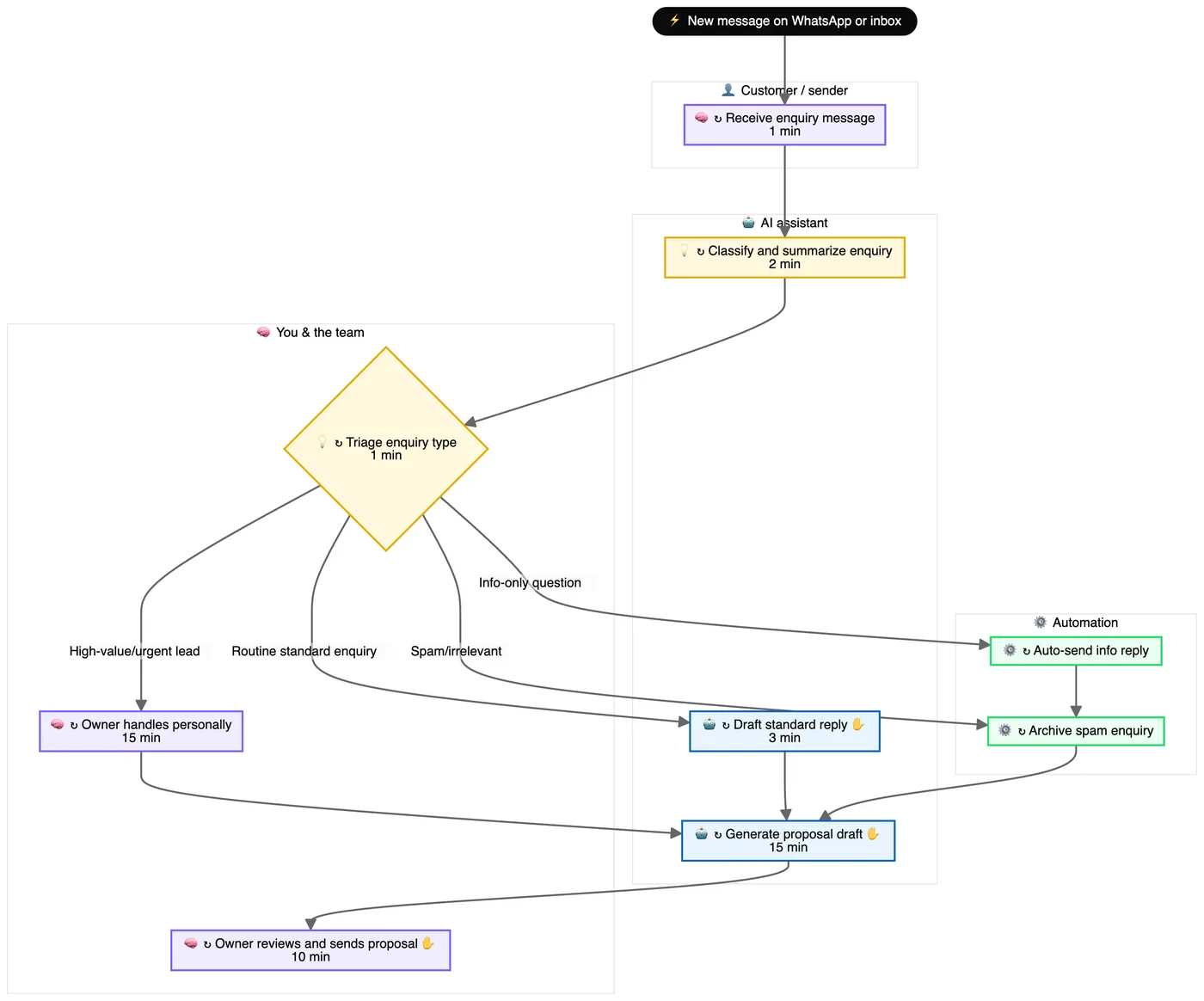
In this map, the "You & the team" lane holds the triage decision, the high-value leads and the final sign-off. Everything routes through one person. That is fine for a founder in year one and a serious risk in year three.
Rule 3: Stitch the maps at the handoffs
Now line the maps up. Wherever one role's output is another role's input, draw the join. For each join, ask four questions:
- How does it travel? Email, WhatsApp, a shared drive, a verbal "I'll send it"?
- How long does it wait before the next person picks it up?
- Does anyone re-type it? Duplicate data entry is the most automatable waste there is.
- Who is responsible if it goes missing? If two people answer "the other one", you have found a gap.
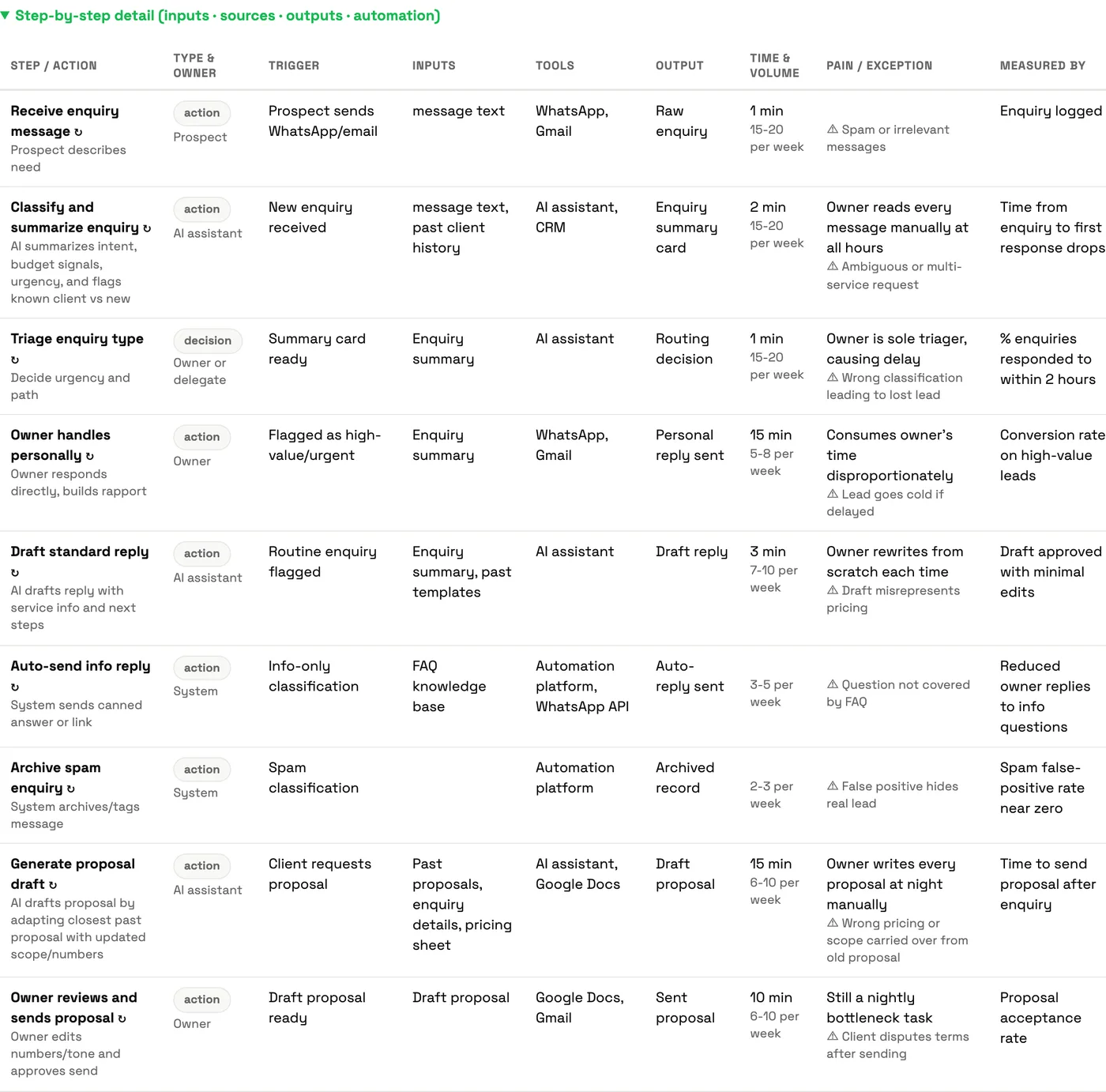
The detail table under each map gives you the raw material: every step's inputs, tools, outputs, and the pain point in the words of the person who does it.
Rule 4: Count before you change
Opinions about "the slow part" are usually wrong. Counting is not. For each role, note three numbers the mapper gives you: steps that need approval, steps that could run themselves, and the time per cycle. Add them up across the department and the conversation changes from "we are busy" to "we have 40 approval waits a week and 3 of them matter."
Rule 5: Fix the joins first, then the steps
Run ECRS on the handoffs before the tasks. Eliminate the re-typing. Combine approvals into one daily slot. Rearrange so the check happens before the work, not after. Then look for steps that could run themselves. The order matters: an automation that speeds up one role while the handoff still waits three days has saved nobody anything.
A half-day department mapping workshop
- 0:00 Pick one workflow that crosses at least three roles.
- 0:15 Everyone maps their own role in the mapper.
- 1:00 Print or share the maps. Stitch them at the handoffs on a wall or screen.
- 2:00 Mark every wait, re-type and ownership gap in red.
- 2:45 ECRS the red marks. Agree on three changes and an owner for each.
- 3:30 Pick one step marked "could run itself" and build it, or plan it for the Automation Lab.
For what this looks like when it works, read how we mapped and automated our own news and jobs desk.
Learn it with Cocoon
Department mapping is the heart of our enterprise and bespoke programmes. A Cocoon trainer facilitates the room, keeps the maps honest, and gets the team from "we should use AI" to three owned changes and one working automation in a single session. Across the region, teams choose Cocoon because our trainers have done this inside real businesses, not just in slides. Enterprise AI training or book a call.
Frequently asked questions
How do you map workflows for a whole department?
Map role by role first, then stitch the maps together at the handoffs. Each person describes their own work; you then line up where one role's output becomes another role's input and look closely at those joins.
Who should be in a workflow mapping session?
The people who do the work, not only their managers. Include one person from each role that touches the workflow and someone who can decide on changes.
What should you look for on a department map?
Handoffs, waits, duplicate data entry, approval bottlenecks, and steps where two roles each think the other is responsible. Those joins are usually where the time goes.
How long does mapping a department take?
For a team of five to ten people, plan a half-day workshop: individual maps in the first hour, stitching and discussion after, and a ranked list of changes by the end.
Have each person in the team map their own role, then compare the maps side by side.
Start with one role →