What Is Workflow Mapping? Map Your Work Before AI Touches It
Every week someone tells us, "we want to automate our reporting." Then we ask them to describe the reporting, step by step, and something interesting happens. Three people in the room give three different versions. One step turns out to exist only because a manager asked for it in 2021. Another waits four days for an approval nobody reads.
That conversation is workflow mapping, and it is the single most useful thing you can do before you let AI anywhere near your work.
A workflow map, defined
A workflow map is a picture of how one piece of work actually happens. Not how the policy document says it happens. How it really happens on a Tuesday. A good map answers six questions for every step:
- What starts it? The trigger: a new email, a form, the first Monday of the month.
- What happens? A short verb phrase: "classify the enquiry", "pull ad spend".
- Who does it? A person, a team, a system, or an AI assistant.
- With what? The inputs, and the tools they live in.
- What comes out? The output handed to the next step.
- Where does it get stuck? Waits, approvals, rework, the thing everyone complains about.
Here is a real map, drawn by our Workflow Mapper from a business owner's description of how they handle new enquiries:
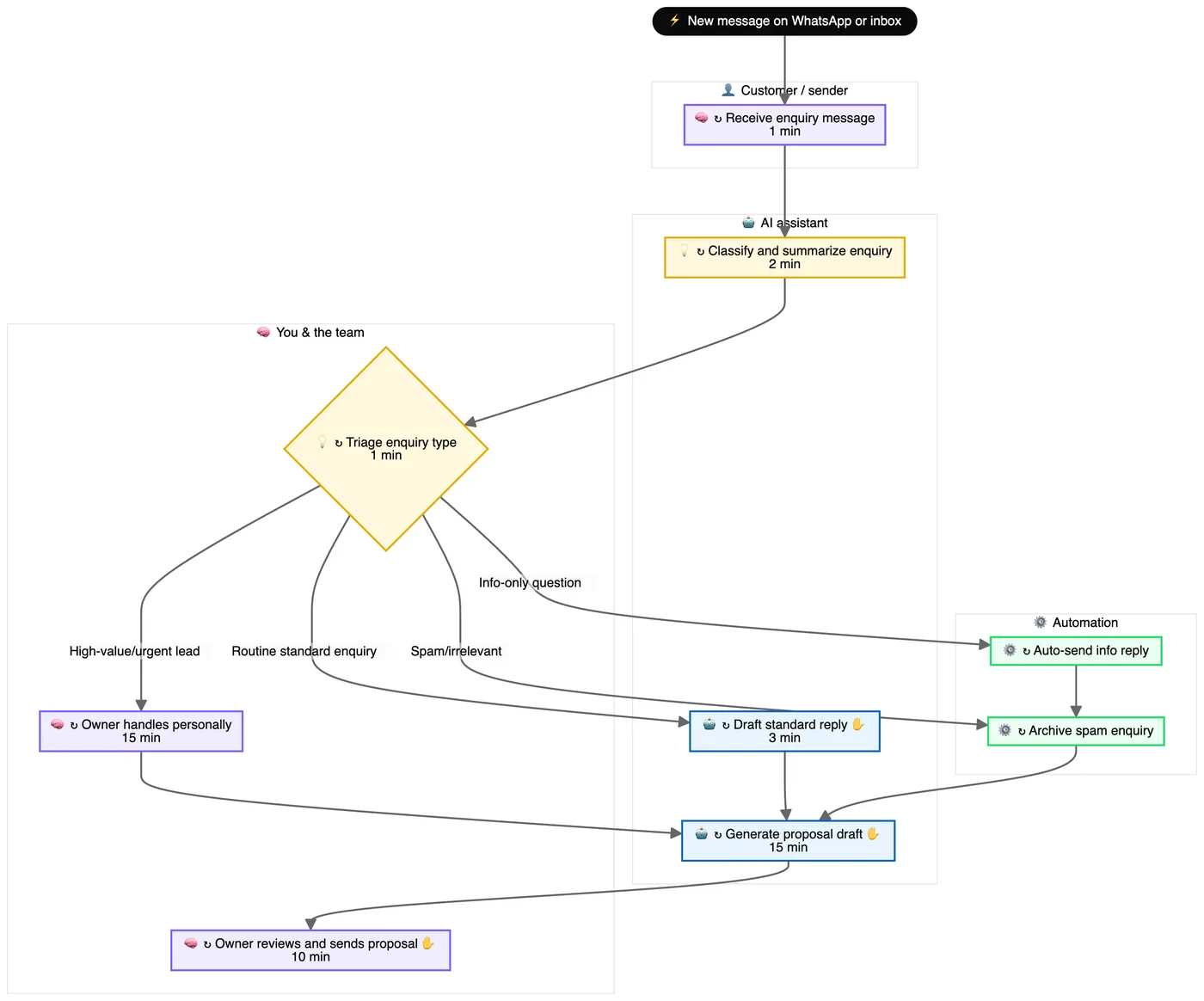
Look at what the picture tells you in five seconds. The owner sits in the middle of everything: every enquiry passes through their triage decision. Two steps (auto-reply and spam archiving) already run themselves. Two more are drafted by AI but still wait for the owner's hand. That is not a technology insight. It is a workload insight, and you only get it by drawing the thing.
Why the map comes before the machine
Automation is a photocopier for processes. Give it a clean process and you get clean output at scale. Give it a messy one and you get mess, faster, in larger quantities, with nobody watching.
A map protects you from three expensive mistakes:
- Automating a step that should not exist. The cheapest automation is deleting the step. You can only see that on a map. (This is the E in ECRS.)
- Automating the wrong bottleneck. Teams speed up the step that feels annoying while the real delay is a four-day wait two steps later.
- Automating judgement. Some steps need a human because they carry a relationship, a risk, or a decision nobody wants a machine making. A map makes you name them.
The three labels that change everything
Once the steps are on the page, tag each one with one of three labels. This is where mapping turns into an AI plan:
- Could run itself. Rules-based, repeated, low risk. Archive spam. File the invoice. Create the client folder.
- AI assists you. AI drafts, summarises or classifies; a person checks. Draft the reply. Summarise the enquiry.
- Stays human. Judgement, relationships, accountability. Handle the high-value lead. Approve the price.
These labels line up with the 3 As of AI: "could run itself" is automation, "AI assists you" is acceleration or augmentation, and "stays human" is the work that makes you worth hiring. Our mapper applies them to every step and then counts them, so you see the shape of your role in numbers:

That "13 need approval" number is usually the most important one on the page. It is rarely the doing that slows a business down. It is the waiting.
How to draw your first map in 15 minutes
- Pick one workflow, not your whole job. "Handling a new enquiry" beats "sales".
- Start from the trigger. What exactly kicks it off? Write it at the top.
- Walk it forward out loud. Describe the last real example, not the ideal one. Every "then I..." is a step.
- Mark every wait and every "it depends". Waits become blockers on the map; "it depends" becomes a decision diamond.
- Tag each step: runs itself, AI assists, or stays human.
- Circle the one step you would remove if you could. That is your first improvement, and it costs nothing.
You can do this on paper. Or you can type it the way you would explain it to a new colleague, and let the Workflow Mapper draw it, tag it and ask you the questions your description left open. We walk through that in how to use the Workflow Mapper.
Learn it with Cocoon
Workflow mapping is the first hour of almost every Cocoon programme, because everything else depends on it. Our trainers are practitioners who map, build and run AI workflows in their own businesses every week, and they bring that into the room: your real processes, your real tools, and a plan you leave with. That is why teams across the region choose Cocoon as their AI training and upskilling partner. Meet the trainers or book a call.
Frequently asked questions
What is workflow mapping?
Workflow mapping is drawing how a piece of work actually happens: what starts it, each step in order, who or what does each step, the tools and information involved, the decisions, and where the work waits. The result is a map you can read, question and improve.
What is the difference between a workflow map and a process map?
They are close cousins. A process map often describes the official procedure. A workflow map describes what really happens day to day, including the workarounds, waits and handoffs, which is what you need before automating anything.
Do I need special software to map a workflow?
No. Sticky notes work. A tool like the Cocoon Workflow Mapper is faster because you describe the work in your own words and it draws the map, tags each step and asks about the parts you left vague.
Why map a workflow before automating it?
Because automation copies whatever you give it. If the process has a pointless approval or a step nobody needs, the automation will repeat that waste faster. Mapping shows you what to remove before you build.
Describe your role in plain words and get your own workflow map, with every step tagged by what AI can take.
Map my workflow →