Automation Lab Levels 1 to 5: From Your First Wire to an Agent With a Voice
The Automation Lab drops you into a new job at Sunrise Coffee Co. with one instruction: automate the boring stuff. Four to five customer emails arrive every morning: a refund request, a delivery question, a complaint, and one customer who writes twice. Each level adds one idea. Here is what each one teaches, and what "solved" looks like.
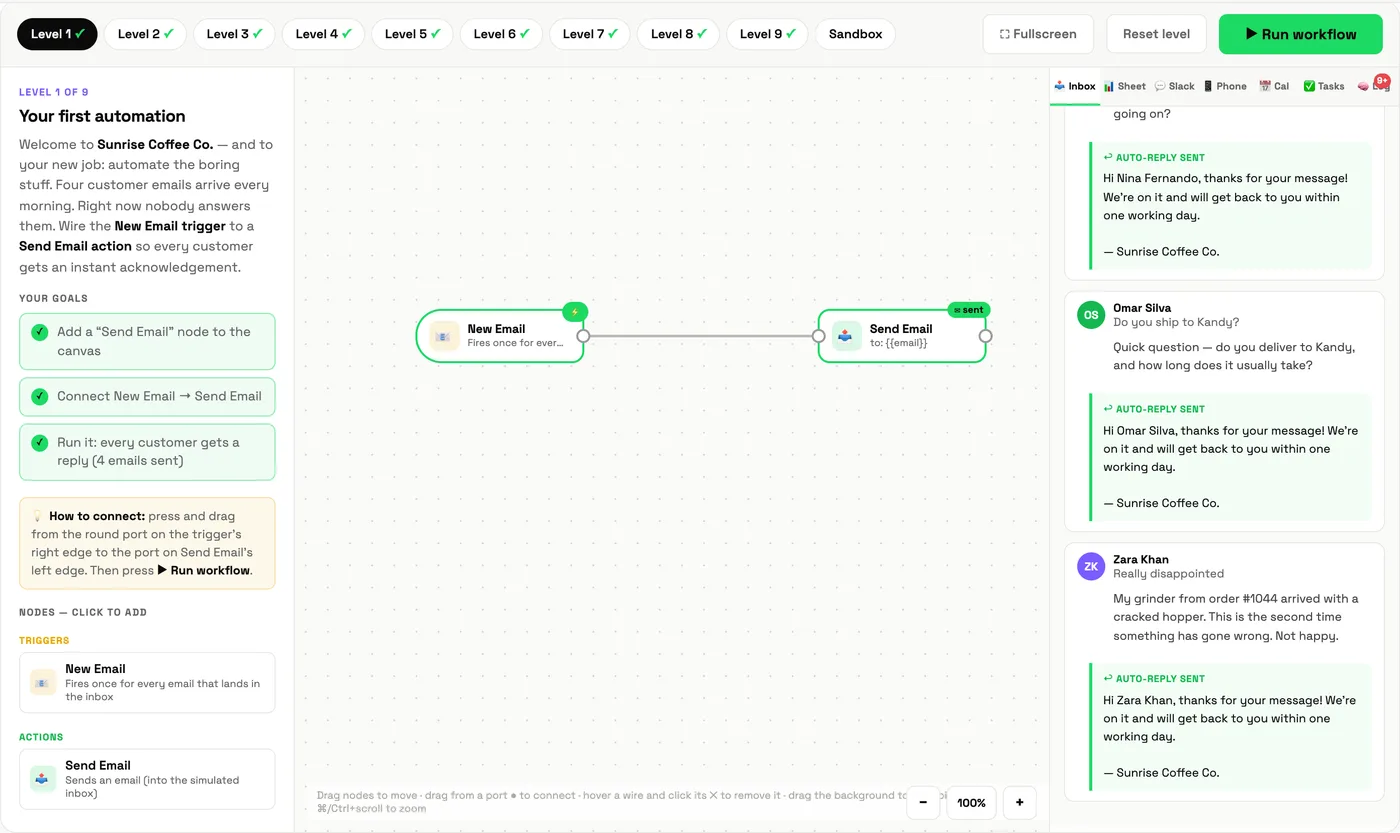
Level 1: Your first automation
Mission: nobody answers the morning emails. Wire the New Email trigger to a Send Email action so every customer gets an acknowledgement.
What you learn: the trigger, the action, and the wire between them. Data flows along the wire as fields ({{name}}, {{subject}}) that fill in the reply.
Level 2: Route and record
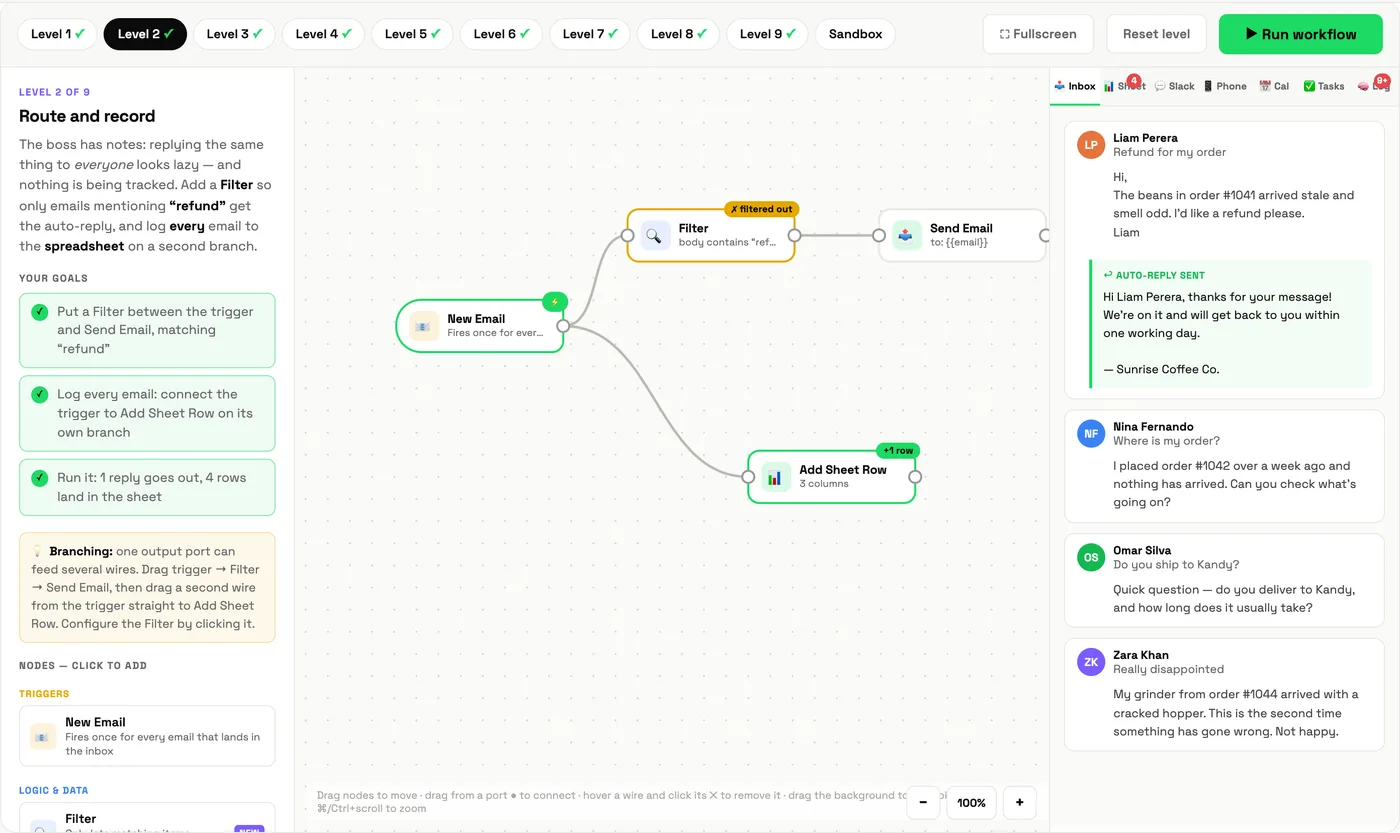
Mission: the boss says replying the same thing to everyone looks lazy, and nothing is tracked. Only reply to emails about refunds, but log every email to the spreadsheet.
What you learn: filters (a gate) and branches (one output feeding several paths). The goal check is exact: one reply goes out, four rows land in the sheet.
Level 3: Hire an AI agent
Mission: Nina asked about a delivery and got "thanks, we are on it." Embarrassing. Replace the fixed rule with an AI Agent that writes a reply for each customer.
What you learn: the difference between a rule and an agent, and the anatomy of an agent step. The agent has three connection points underneath: model, memory and tool. The lab asks you to run it first without a model, so you see it fail. That error is the most common beginner mistake in real tools.
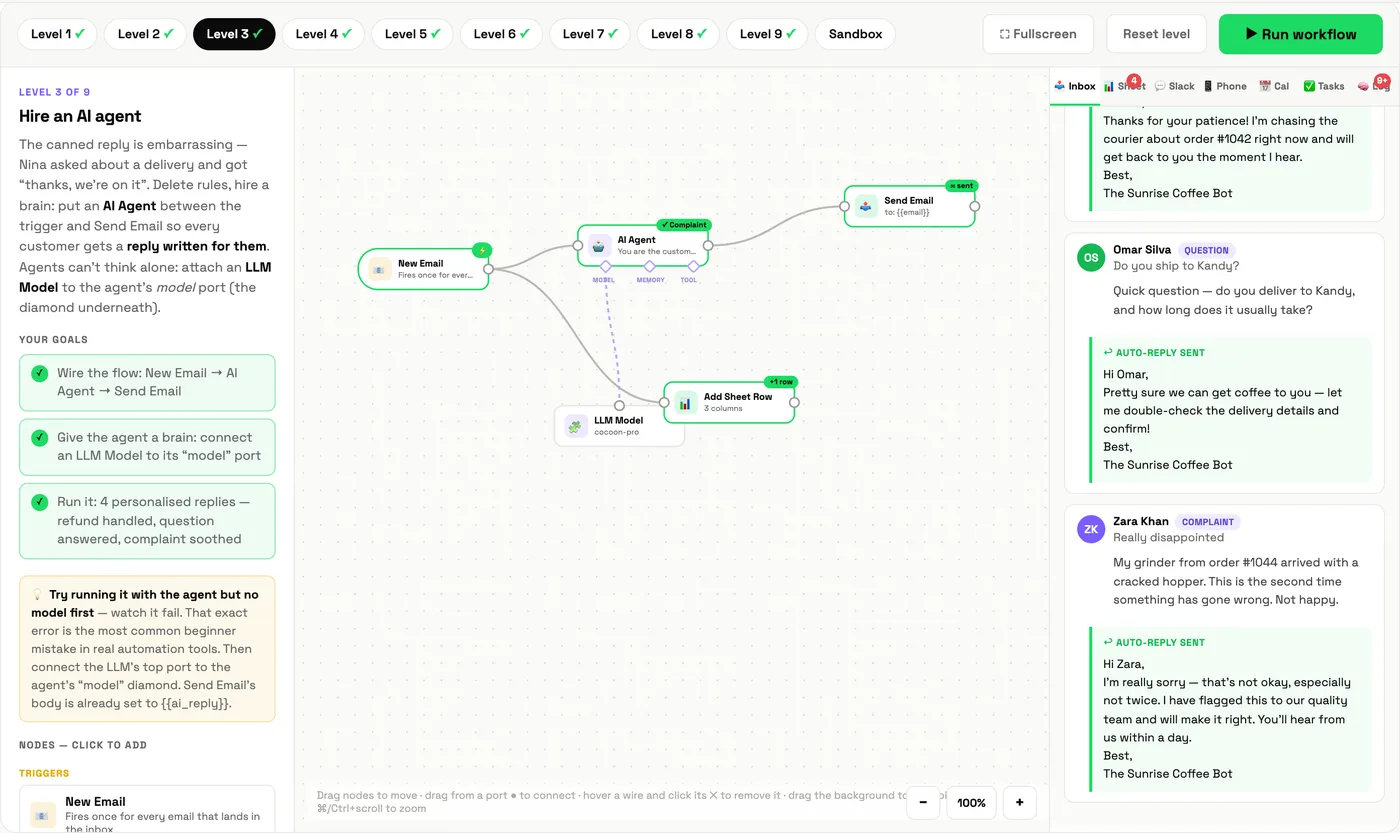
Look at the inbox on the right. Omar asked whether they ship to Kandy and got an answer about delivery. Zara, whose grinder arrived cracked, got an apology. Same workflow, different replies, because the agent reads each email.
Level 4: Give it a memory
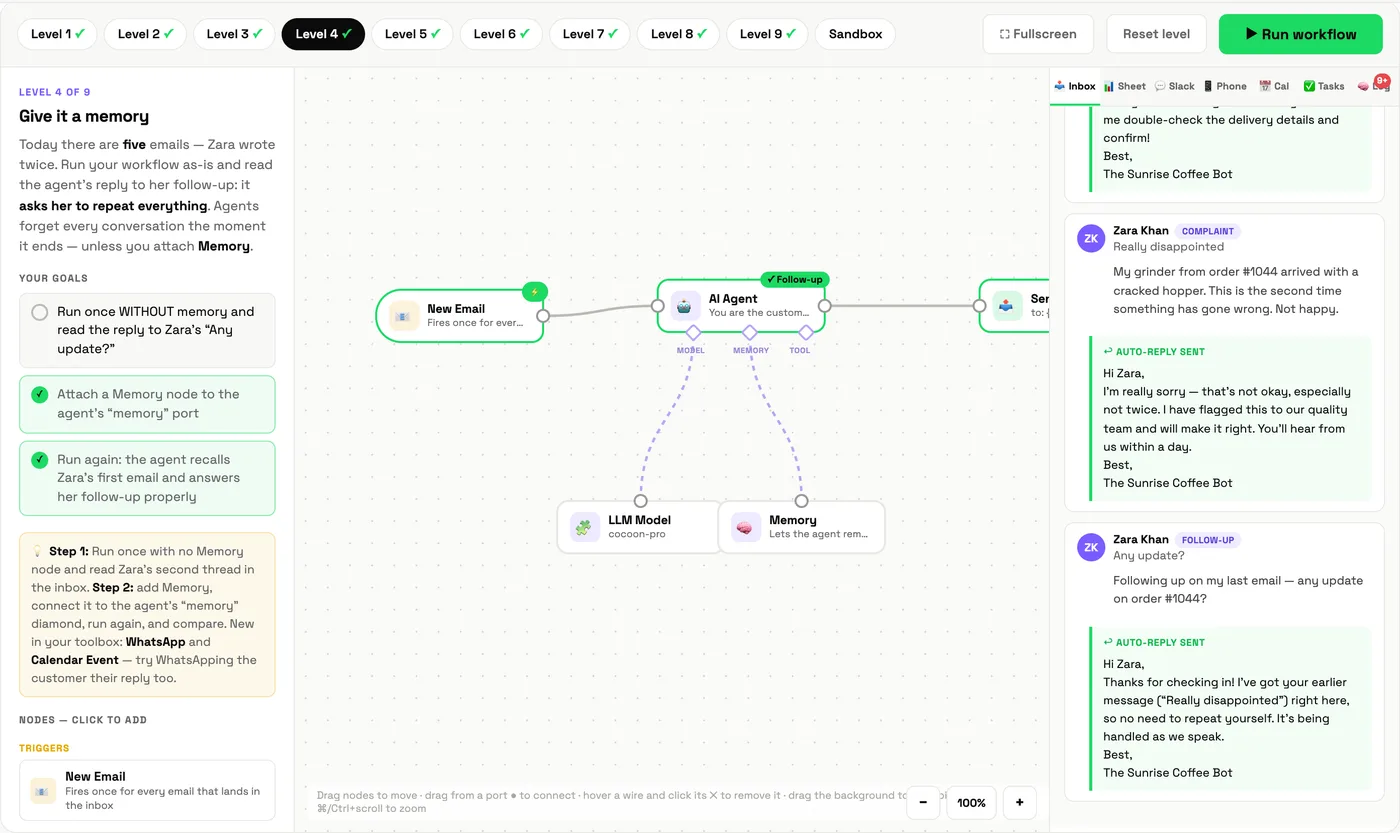
Mission: today Zara writes twice. Run the workflow and read the agent's reply to her follow-up: it asks her to repeat everything. Agents forget every conversation the moment it ends, unless you give them memory.
What you learn: memory as a separate component, keyed by who is writing. The before-and-after is the lesson: run once without memory, attach it, run again, compare.
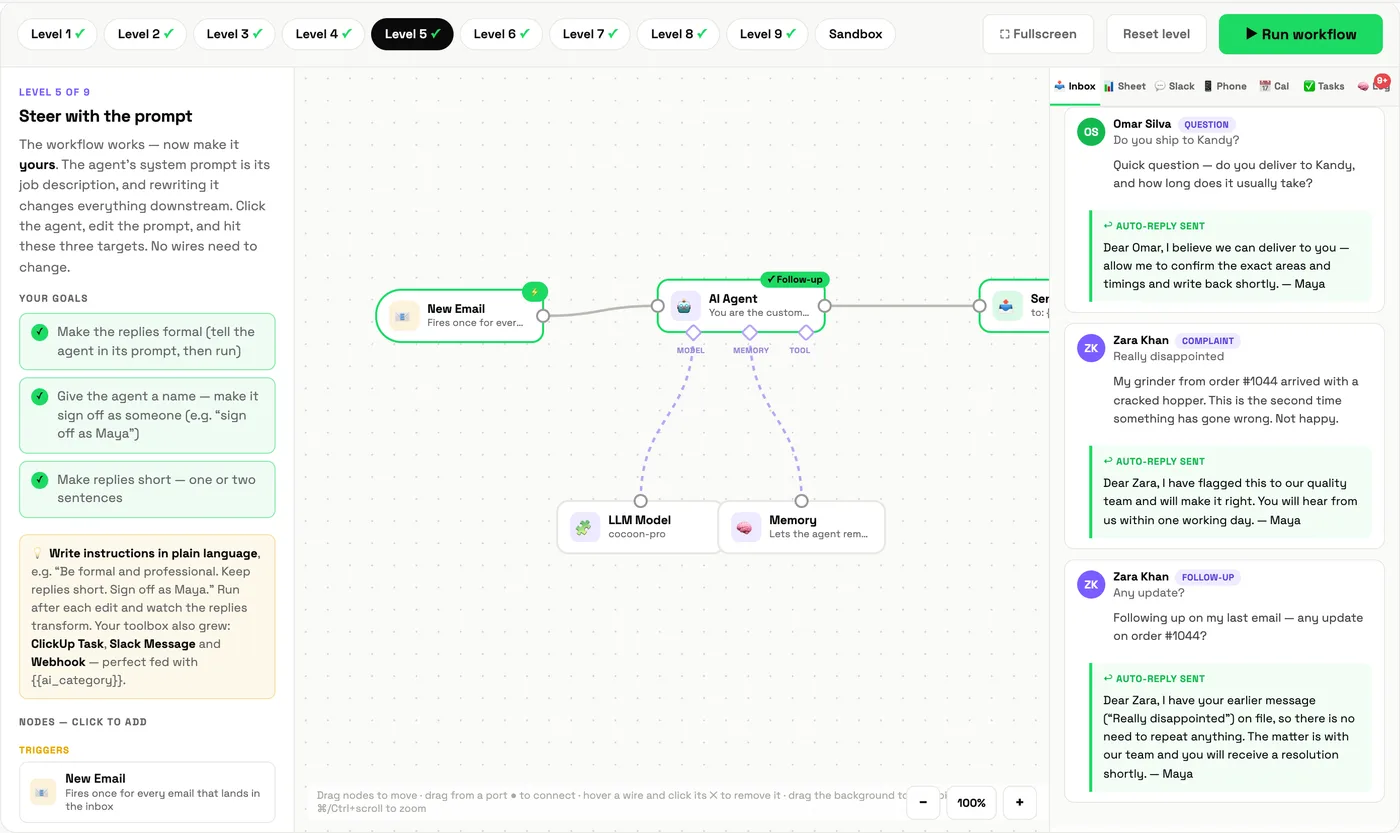
Level 5: Steer with the prompt
Mission: the workflow works. Now make it yours. Rewrite the agent's system prompt so replies are formal, short, and signed off by a named person.
What you learn: the system prompt is the agent's job description, and changing it changes every reply downstream without touching a single wire.
What you can do after Level 5
You can now read and build the core of most business automations: trigger, logic, agent, memory, prompt. That is enough to automate a support inbox, a lead form or a daily report in a real workflow builder. The next five levels are where it gets professional: tools, structured prompts, cleaning up a broken workflow, and two agents working together. Continue with Levels 6 to 10.
Not sure which of your own processes to automate first? Map them in the Workflow Mapper and look for the steps tagged "could run itself".
Learn it with Cocoon
The lab gets you started. A Cocoon workshop gets you finished: our trainers help your team build these same patterns on your real inbox, forms and tools, and stay with you while they go live. That hands-on approach is why Cocoon is the AI training and upskilling company teams across the region come back to. Meet the trainers or book a call.
Frequently asked questions
What is the Cocoon Automation Lab?
A free browser-based trainer for workflow automation. You build automations on a drag-and-drop canvas inside a simulated company, Sunrise Coffee Co., across nine guided levels and a free-build sandbox.
Do I need any experience to start?
No. Level 1 teaches the idea of a trigger and an action with a single wire. Each level adds one new concept.
Why does the AI agent fail in Level 3?
On purpose. An agent needs a language model connected to think with. Running it without one reproduces the most common beginner mistake in real automation tools, so you learn to recognise the error.
Does the Automation Lab use real email or real AI?
No. Everything is simulated in your browser so you can experiment safely. The concepts match the ones you will meet in real workflow builders.
Five levels, about twenty minutes, and you will have built an AI agent with memory and a personality.
Start Level 1 →